

Course episodes / unit 04
Summary
Core Web Vitals are Google's real-user metrics for loading (LCP ≤ 2.5s), tap responsiveness (INP ≤ 200ms) and layout stability (CLS ≤ 0.1), judged at the 75th percentile. Removing unused third-party scripts, prioritising the hero image and breaking up long main-thread tasks fixes most failures. Deloitte's 2020 study found a 0.1s faster mobile site lifted retail conversions by 8.4%.

Unit 04 // Workstation
Bring LCP under 2.5s
- 02 Tool
- PageSpeed Insights and Squoosh.app (free)
- 04 Where to edit
- Online Store → Themes → ⋯ → Duplicate (backup first). Then Customize → your hero or Image banner section → replace the image.
- 04 Where to save
- Click Save in the theme editor.
- 05 Verify
- Re-run pagespeed.web.dev on mobile. Field data (real users) is a 28-day average, so confirm in Search Console → Experience → Core Web Vitals about four weeks later.
- Pass
- LCP is 2.5s or less on mobile.
- Fail
- LCP is over 4s: Google rates that poor.
Episode 4 of the free Zero to Revenue SEO course. Previous: Episode 3, Programmatic Scaling (/blog/zero-to-revenue-seo-programmatic-scaling). New here? Start with Episode 1, How Google Actually Works (/blog/zero-to-revenue-seo-how-google-works). More episodes are on the way; each new one is added to the course home (/resources).
In Episode 3, we mastered programmatic scaling: building a 12-column data matrix, splitting sitemaps with generateSitemaps(), and generating landing pages that stay out of the doorway trap.
But once Googlebot indexes your catalog and thousands of high-intent searchers land on your storefront every day, your organic search empire faces its most ruthless commercial bottleneck: mobile latency.
Google's 2016 mobile speed research found 53% of mobile site visits are likely to be abandoned if a page takes longer than 3 seconds to load.
If a shopper taps 'Add to Cart' or 'Select Size' and the screen freezes for 600 milliseconds because the browser is choking on four megabytes of marketing scripts, they do not wait.
They close the tab, return to Google, and purchase from your competitor. In March 2024, Google made this exact friction point one of its Core Web Vitals: Interaction to Next Paint (INP), part of the page experience signals its ranking systems use.
This masterclass is the complete engineering and operational blueprint for passing Core Web Vitals for real shoppers on real phones.
Whether you run a Shopify boutique bogged down by app stack bloat, manage a content catalog on WordPress, or engineer custom edge storefronts in Next.js 16, this guide gives you the exact diagnostic tools, 3-minute script purge SOPs, cooperative yielding primitives, and live verification criteria to ensure your digital real estate converts at its maximum potential.
The Mental Model: The Frozen Cashier vs. The Abandoned Shopping Cart
To understand why Google rewards fast websites and why customers bounce, consider an everyday mental model: Imagine you enter a luxury boutique on Fifth Avenue or Bond Street. You select a bespoke cashmere jacket that fits you perfectly.
You walk to the cash register to hand over your credit card. But the cashier is completely frozen in place, frantically juggling fifteen clipboards, six loyalty card scanners, a customer survey form, and four promotional flyers.
You tap your credit card on the payment terminal. Nothing happens. You tap it again. Still frozen. You wait five seconds, eight seconds, twelve seconds while a queue forms behind you. What do you do?
You do not ask to speak to the store manager. You drop the jacket on the counter and you walk out the front door.
In e-commerce, that frozen cashier appears on mobile screens all day long.
Founders will spend ₹5,00,000 on Facebook and Google Ads to acquire a qualified shopper, only to force that customer to interact with a frozen cashier. In technical terms, that frozen cashier is a saturated browser main thread.
When the main thread is 100% occupied compiling and executing bloated JavaScript, it cannot process touch events. Core Web Vitals are how Google measures that wait. Good scores are part of the page experience Google's ranking systems reward; they are not a penalty system, and relevance still matters far more.
The Forensic Anatomy: LCP, INP & CLS Explained Simply
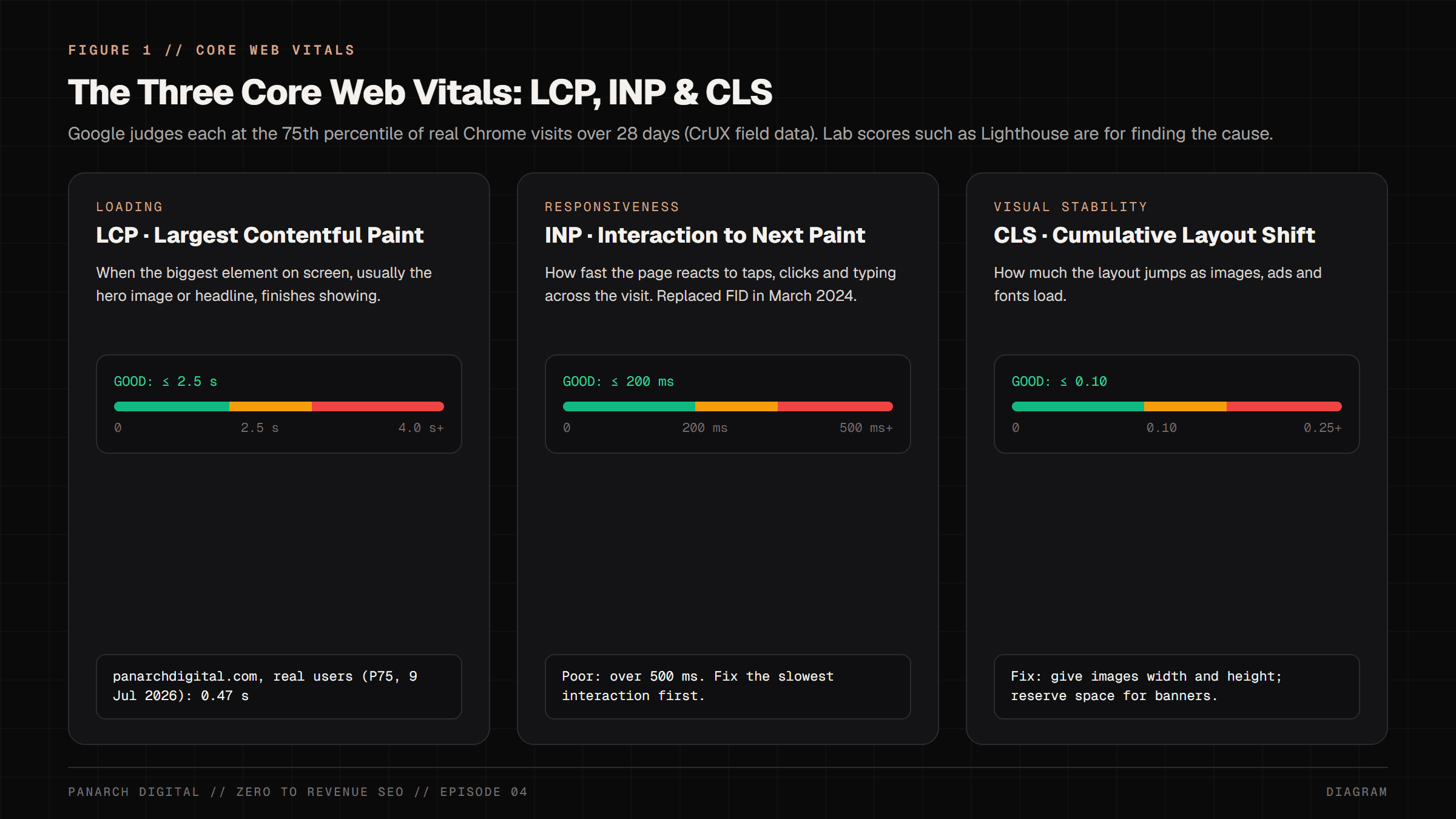
Google evaluates web performance using the Chrome User Experience Report (CrUX), which collects anonymous timing data from real Chrome users who opt in, and judges each metric at the 75th percentile of your visits over the last 28 days.
The triad measures three distinct user journey phases:
- LCP (Largest Contentful Paint) - Loading Velocity: Measures the time elapsed from the initial URL navigation until the largest visual element on the screen (the hero product photograph or primary H1 headline) finishes rendering. Good: ≤ 2.5s. Poor: > 4.0s.
- INP (Interaction to Next Paint) - Tap Responsiveness: Replaced First Input Delay (FID) in March 2024. INP measures the slowest delay between a user interaction (tapping 'Add to Cart', clicking a variant swatch, or typing in search) and the next frame painted on screen. On busy pages it ignores one outlier per 50 interactions, so it is close to the worst. Good: ≤ 200ms. Poor: > 500ms.
- CLS (Cumulative Layout Shift) - Visual Stability: Quantifies unexpected layout shifts during the entire page lifecycle as web fonts, promotional banners, or un-dimensioned images pop in and push text downward. Good: ≤ 0.10. Poor: > 0.25.
The Main Thread Hydration Chasm: Why Client-Side SPAs Freeze
Why do modern single-page applications and bloated monolithic e-commerce themes so often fail INP? The culprit is the Client-Side Hydration Chasm: the browser rebuilding the page's interactivity in JavaScript after it arrives.
When a browser downloads a client-rendered React or theme bundle, it must parse, compile, and execute megabytes of JavaScript on a single thread.
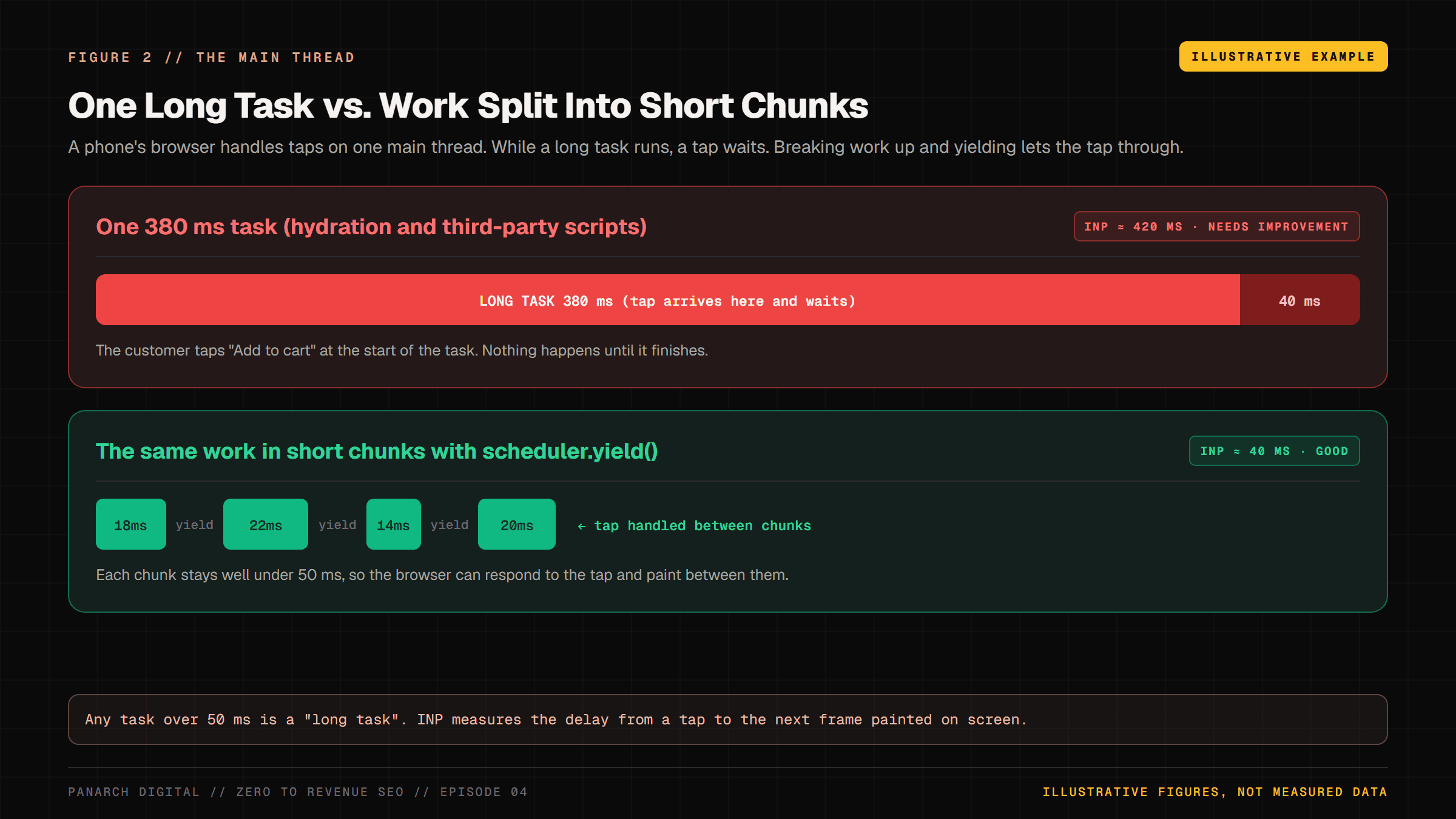
Browsers treat any task on the main thread that runs longer than 50 milliseconds as a 'Long Task'. While a Long Task runs, the browser cannot respond to user input.
If a mobile user taps their screen during that window, the interaction is queued, resulting in noticeable tap lag and frustrated rage clicks:
The Shopify App Stack Tax: How 15 Scripts Destroy Conversion
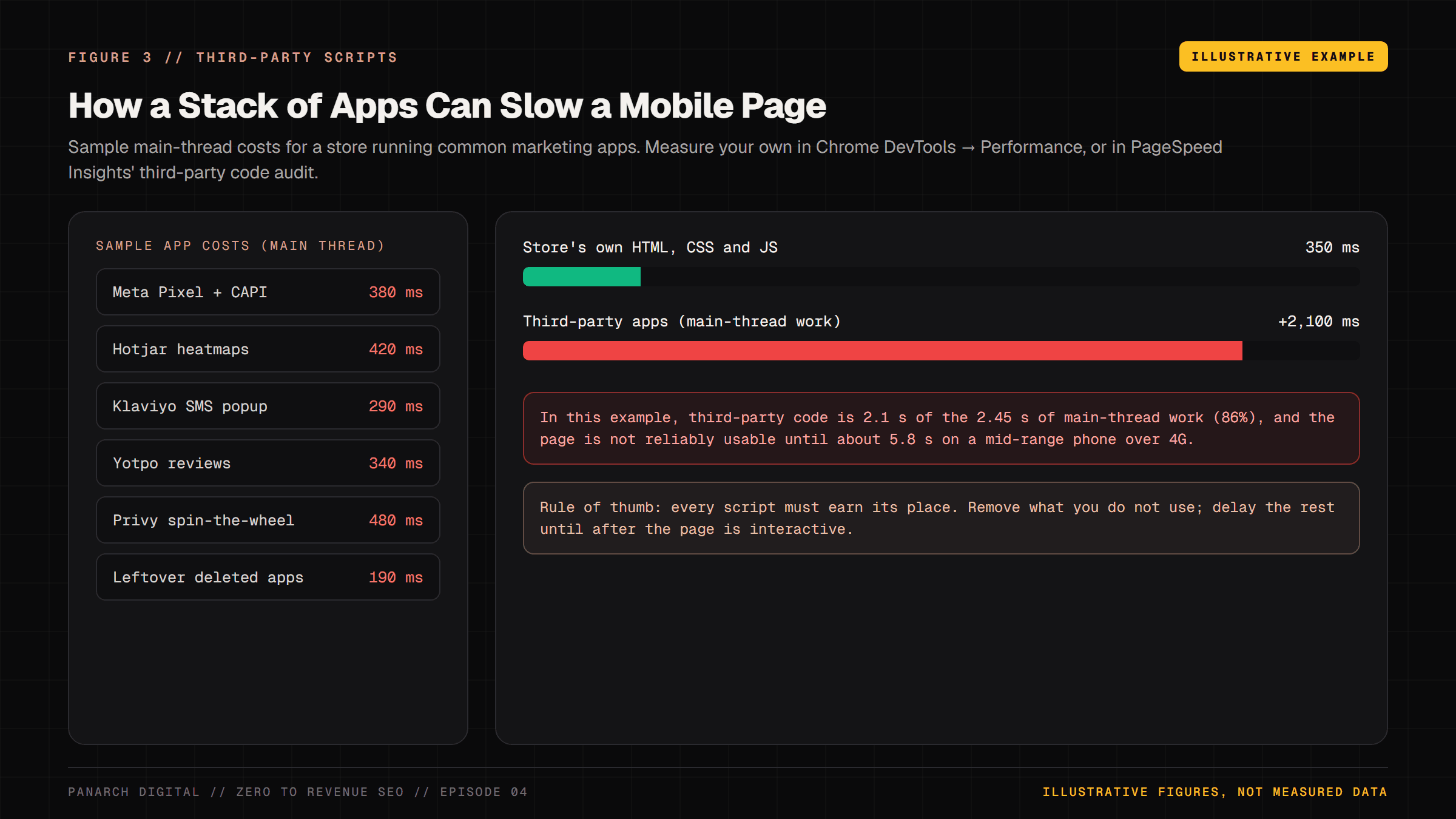
Most store owners believe installing marketing apps (Privy wheel popups, Klaviyo SMS bars, Hotjar heatmaps, Yotpo review stars) is free. In reality, each unmonitored third-party app levies a devastating 'performance tax'.
Every app that adds a script to your storefront costs main-thread time on a shopper's phone. Below is an illustrative example of how a stack of common apps adds up:
Track A: The Non-Coder 3-Minute Speed Purge (Shopify & WordPress)
If you have zero coding knowledge and run an e-commerce store on Shopify or WordPress, you can often make a real dent in mobile load time in under an hour by executing this exact 3-step SOP:
Step 1: The Shopify Ghost Script Purge. Back up first: go to Shopify Admin > Online Store > Themes, click the three dots next to your live theme and choose Duplicate. Then uninstall the apps you no longer use. Most apps load through App embeds, so open Customize on your live theme, select App embeds in the left sidebar, and switch off every embed for an app you removed. That is the zero-code fix.
Older apps sometimes leave a script pasted into the theme itself. Only then: click the three dots > Edit Code, open layout/theme.liquid, press Ctrl+F and search for '<script'. Look for references to apps you uninstalled (e.g. 'hotjar', 'privy', 'loox', 'yotpo'), delete only those blocks, and click Save. If anything breaks, publish your duplicate to restore the old theme.
Re-run PageSpeed Insights and compare Total Blocking Time before and after, so you know what the purge saved.
Step 2: WebP / AVIF Image Optimization. Never upload raw 5-megabyte camera photos directly to your CMS. Before uploading, run your hero banners and product shots through Squoosh.app (Google's free open-source image tool) or TinyPNG.
Export as WebP or AVIF with quality set to about 80%. A multi-megabyte camera JPEG often ends up under 150KB with no visible loss, and a lighter hero image usually means a faster LCP.
Step 3: WordPress / WooCommerce JavaScript Delay. In WordPress, install one caching plugin: LiteSpeed Cache (free) or WP Rocket (paid). In WP Rocket, open File Optimization > JavaScript Files and tick 'Delay JavaScript execution'; LiteSpeed Cache has a similar delay option under Page Optimization > JS Settings. Then clear the plugin's cache (and Cloudflare's, if you use it) so visitors get the new version.
This stops heavy marketing trackers from running during the initial page load, so your LCP hero can paint sooner. Test checkout and forms afterwards, as delayed scripts occasionally break them.
Track B: The Sovereign Engineering Route (Next.js 16 App Router, for Developers)
For software engineers building sovereign headless storefronts in Next.js 16, Core Web Vitals mastery is achieved by combining React Server Components (RSC), cooperative main-thread yielding, and edge image optimization.
Below is the production implementation:
"use client";
import { useState, useTransition, type FC } from "react";
interface Variant {
id: string;
name: string;
inStock: boolean;
priceFormatted: string;
}
interface Props {
variants: Variant[];
onSelect: (variant: Variant) => void;
}
// 1. Cooperative Yielding Primitive to Break Long Tasks (>50ms)
async function yieldToMain(): Promise<void> {
if ("scheduler" in globalThis && "yield" in (globalThis as any).scheduler) {
await (globalThis as any).scheduler.yield();
} else {
await new Promise((resolve) => setTimeout(resolve, 0));
}
}
export const SovereignVariantPicker: FC<Props> = ({ variants, onSelect }) => {
const [selectedId, setSelectedId] = useState(variants[0]?.id);
const [isPending, startTransition] = useTransition();
const handleSelect = async (variant: Variant) => {
// Update the selection first so the tap feels instant
setSelectedId(variant.id);
// Yield to main thread before running heavy stock / price calculations
await yieldToMain();
startTransition(() => {
onSelect(variant);
});
};
return (
<div className="flex flex-wrap gap-2 my-4" role="radiogroup" aria-label="Product Variants">
{variants.map((v) => (
<button
key={v.id}
type="button"
role="radio"
aria-checked={selectedId === v.id}
onClick={() => handleSelect(v)}
className={`px-4 py-2 text-xs font-mono rounded-lg border transition-all ${
selectedId === v.id
? "border-primary bg-primary/20 text-primary font-bold shadow-sm"
: "border-border bg-surface text-foreground/70 hover:border-foreground/30"
}`}
>
{v.name} • {v.priceFormatted}
</button>
))}
</div>
);
};LCP Hero Preloading in Next.js 16
The most common reason modern websites fail LCP is lazy loading their primary hero image.
When an <img> tag has loading='lazy', the browser waits until it has worked out the layout before fetching the image, which delays the most important picture on the page.
In Next.js 16, give the Largest Contentful Paint hero image the preload prop. It replaced the older priority prop, which Next.js 16 deprecated.
The next/image component then adds a <link rel='preload'> tag for the image to the document <head>, so the browser starts downloading it straight away instead of discovering it later. Use it on one image only, the LCP element; for other above-the-fold images, loading='eager' or fetchPriority='high' is enough:
import Image from "next/image";
import type { FC } from "react";

interface HeroProps {
  src: string;
  alt: string;
}

export const HeroProductMedia: FC<HeroProps> = ({ src, alt }) => {
  return (
    <div className="relative aspect-[4/5] w-full max-w-lg overflow-hidden rounded-2xl border border-border bg-surface">
      <Image
        src={src}
        alt={alt}
        fill
        preload
        sizes="(max-width: 768px) 100vw, 540px"
        className="object-cover"
      />
    </div>
  );
};The Master Tool Stack: Tools to Use & How to Use Them (Free vs. Low-Cost)
You do not need expensive synthetic testing platforms to measure and harden Core Web Vitals. Below is the complete zero-cost toolchain:
- Google PageSpeed Insights & CrUX Vis [₹0 / Official Google]: Real-user field data at the 75th percentile of mobile visits over the last 28 days. CrUX Vis (cruxvis.withgoogle.com) shows the monthly trend and replaced the retired CrUX Dashboard.
- Chrome DevTools Performance & Long Task Profiler [₹0 / In-Browser]: Press F12 > Performance > Click Record. Interact with your page to pinpoint exact JavaScript functions exceeding 50ms.
- WebPageTest Mobile 4G Simulator [Free tier / Web]: Tests your website on mobile device profiles throttled to slow 4G connections, with a filmstrip of how the page loads. Check the current free plan's limits.
- Panarch Core Web Vitals Wizard [₹0 / Open source, MIT]: Our free script that pulls your real-user LCP, INP and CLS and flags script bloat, a lazy-loaded hero image and missing image sizes. Code at github.com/Arpan-Tyagi/panarch-seo-wizards.
- Squoosh.app by Google Chrome Labs [₹0 / Free Web]: The premier web-based image compressor for inspecting side-by-side AVIF and WebP compression artifacts.
3-Minute SOP: Running the Panarch CWV Diagnostic Wizard
Before deploying code or launching ad campaigns, check your live site for performance bottlenecks. The free, open-source Core Web Vitals Wizard (MIT licence, github.com/Arpan-Tyagi/panarch-seo-wizards) runs these checks in one pass. You only need Node.js 18.17 or newer; PageSpeed Insights (pagespeed.web.dev) covers similar ground in a browser.
# Run it straight from GitHub (needs Node.js 18.17+):
npx --package=github:Arpan-Tyagi/panarch-seo-wizards \
  cwv-wizard https://yourdomain.com

# Optional: a free PageSpeed Insights API key avoids the shared quota
PSI_API_KEY=your-key npx --package=github:Arpan-Tyagi/panarch-seo-wizards \
cwv-wizard https://yourdomain.comThe wizard checks four things: 1) your real-user LCP, INP and CLS from the Chrome UX Report, via the free PageSpeed Insights API, 2) server response time and HTML size, 3) third-party script hosts and known trackers (GTM, Meta, Hotjar and others), and 4) image hazards: a lazy-loaded first image, a missing hero preload, images without width and height, old JPEG/PNG formats, and web fonts without font-display.
It prints a checklist score out of 100 with a fix list. The score is the tool's own checklist, not a Google ranking signal.
Live Verification: Green Pass vs. Red Diagnostic Flags
How do you verify whether your speed optimizations succeeded in the real world? Track these exact indicators in Google Search Console:
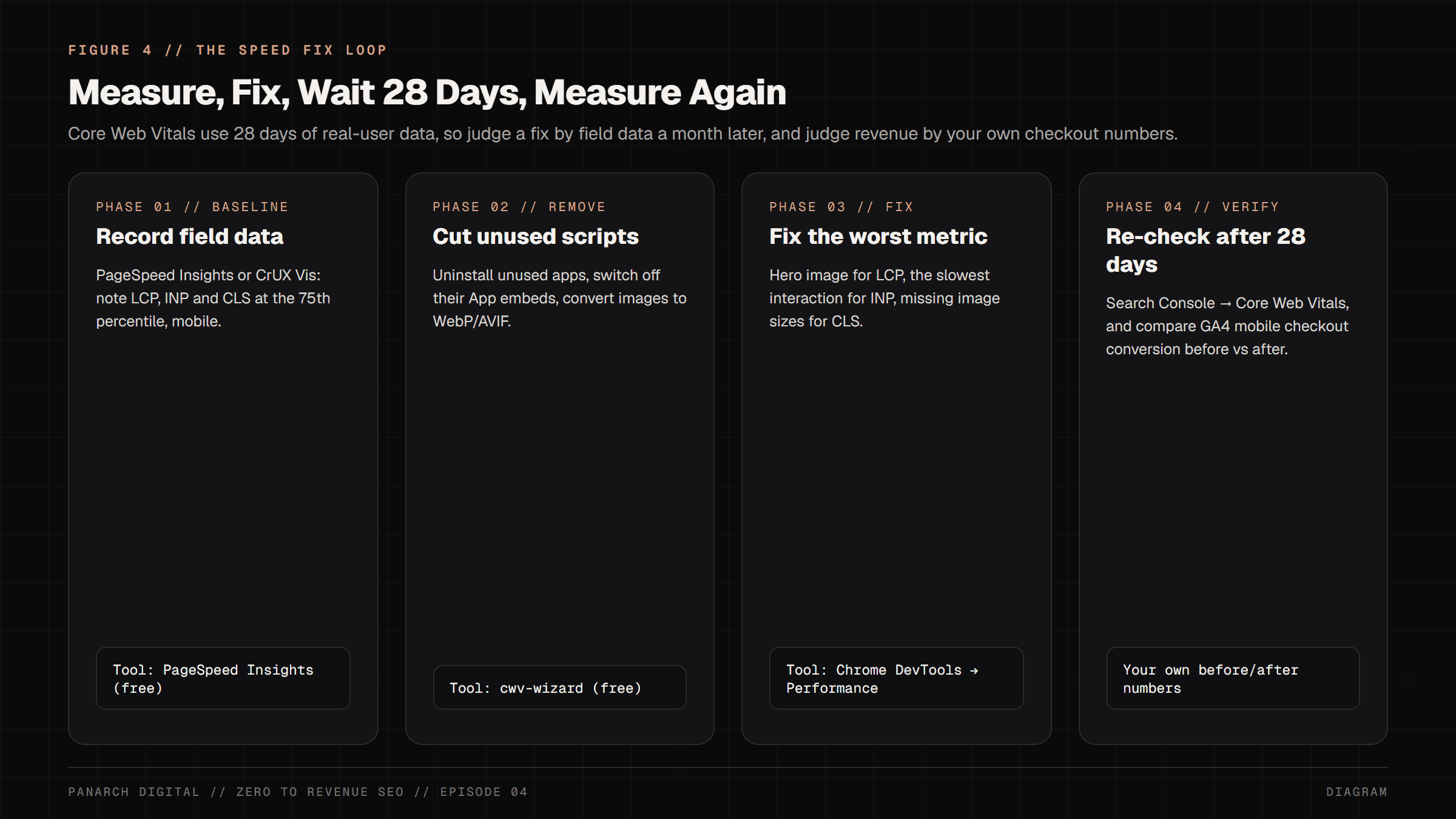
- Green Pass (CrUX Good Assessment): In Google Search Console under Experience > Core Web Vitals > Mobile, your URLs move into 'Good': LCP ≤ 2.5s, INP ≤ 200ms and CLS ≤ 0.1. Because the data covers 28 days, give it about a month. Then compare mobile checkout conversion in GA4 for the 28 days before and after; Deloitte's 2020 study found a 0.1s faster mobile site lifted retail conversions by 8.4%, so even small gains are worth measuring.
- Red Flag (INP Main-Thread Saturation): Search Console reports 'INP issue: longer than 200ms (mobile)'. This indicates that heavy client JavaScript or un-deferred third-party trackers are causing tap lag during user sessions.
- Red Flag (CLS Layout Shifts): Search Console reports 'CLS issue: more than 0.1 (mobile)'. This occurs when promotional banners, dynamic fonts, or images without explicit width/height push content downward while the user is reading.
- Actionable Recovery: If URLs are flagged in red, do not stack a second caching plugin on top of the first; two caching plugins fight each other. Switch off unused App embeds, remove leftover scripts (after duplicating your theme), delay non-essential tracking until the page is interactive, and preload your hero LCP image.
The Panarch Digital Core Web Vitals Triage Checklist (Notion Template)
To help engineering and marketing teams audit and eliminate mobile performance bottlenecks step-by-step, Panarch Digital is turning this SOP into a free Notion checklist. It is being published now; until it is live, Track A and the verification list above are the checklist.
It will cover third-party script audits, image pipelines, font-display settings, and React Server Component blueprints.
When it is live, the link will appear on the course resources hub (/resources). Meanwhile, see our own real-user numbers on the (/performance-baseline) dashboard.
Frequently asked
What is Interaction to Next Paint (INP) and why did it replace FID?
Interaction to Next Paint (INP) replaced First Input Delay (FID) as a Core Web Vital in March 2024. While FID only measured the delay of the very first click on a page, INP looks at all user interactions (clicks, taps, keypresses) during the visit and reports one of the slowest, ignoring one outlier for every 50 interactions. INP accurately reflects real mobile user frustration when buttons freeze.
Why do synthetic Lighthouse lab scores differ from Google Search Console Core Web Vitals?
Lighthouse runs a single simulated test on a controlled computer environment. In contrast, Google Search Console Core Web Vitals reports real human field data collected from real Chrome users (CrUX) over a rolling 28-day window. Google's page experience signals use that field data, not lab Lighthouse scores. Use Lighthouse to find causes and field data to judge results.
How does third-party JavaScript bloat hurt e-commerce mobile conversion rates?
Mobile devices have limited CPU power. When an e-commerce storefront loads a dozen or more marketing scripts (Hotjar, Meta Pixel, popups, review widgets), they execute on the browser's single main thread. When a mobile shopper taps 'Add to Cart', the browser freezes while finishing those tasks, causing tap lag, cart abandonment, and lost sales.
What is cooperative main-thread yielding in modern web engineering?
Cooperative yielding is a programming technique that breaks long computational tasks (>50ms) into small slices using primitives like scheduler.yield() or setTimeout(0). By yielding back to the browser between slices, and keeping each slice well under 50 milliseconds, the browser can repaint the screen and respond to taps in between, which lowers INP.
How can I fix Cumulative Layout Shift (CLS) on product images?
Ensure every <img> element declares explicit width and height attributes in HTML, or uses modern CSS aspect-ratio properties. This allows the browser to reserve the exact layout space before the image downloads from the network, preventing content from jumping downward when the image finishes loading.
Sources
- Google Search Central: Understanding Core Web Vitals and Google search results
- web.dev: Optimize Interaction to Next Paint
- web.dev: Optimize Largest Contentful Paint
- WICG: Prioritized Task Scheduling (draft specification)
- HTTP Archive Web Almanac 2024: Third Parties
- Google: The Need for Mobile Speed, 2016 (53% of mobile visits abandoned after 3 seconds)
- Deloitte (2020): Milliseconds Make Millions
- Chrome for Developers: CrUX Dashboard deprecation
- Next.js docs: Image component (preload)
Related