

Course episodes / unit 03
Summary
Programmatic SEO is the architectural practice of generating high-intent landing pages at scale by pairing modular page templates with structured relational datasets. When every page carries real, distinct data—local turnaround times, service areas, facts you can prove, connected schema and well-split sitemaps—it captures long-tail search demand while staying clear of Google's scaled content abuse and doorway policies.

Unit 03 // Workstation
Add facts that are true only for each page
- 02 Tool
- A spreadsheet and the checker in this lesson (free)
- 04 Where to edit
- Settings → Custom data (definitions). Online Store → Themes → Customize → the template → Connect dynamic source.
- 04 Where to save
- Save in the theme editor; import the sheet with Matrixify.
- 05 Verify
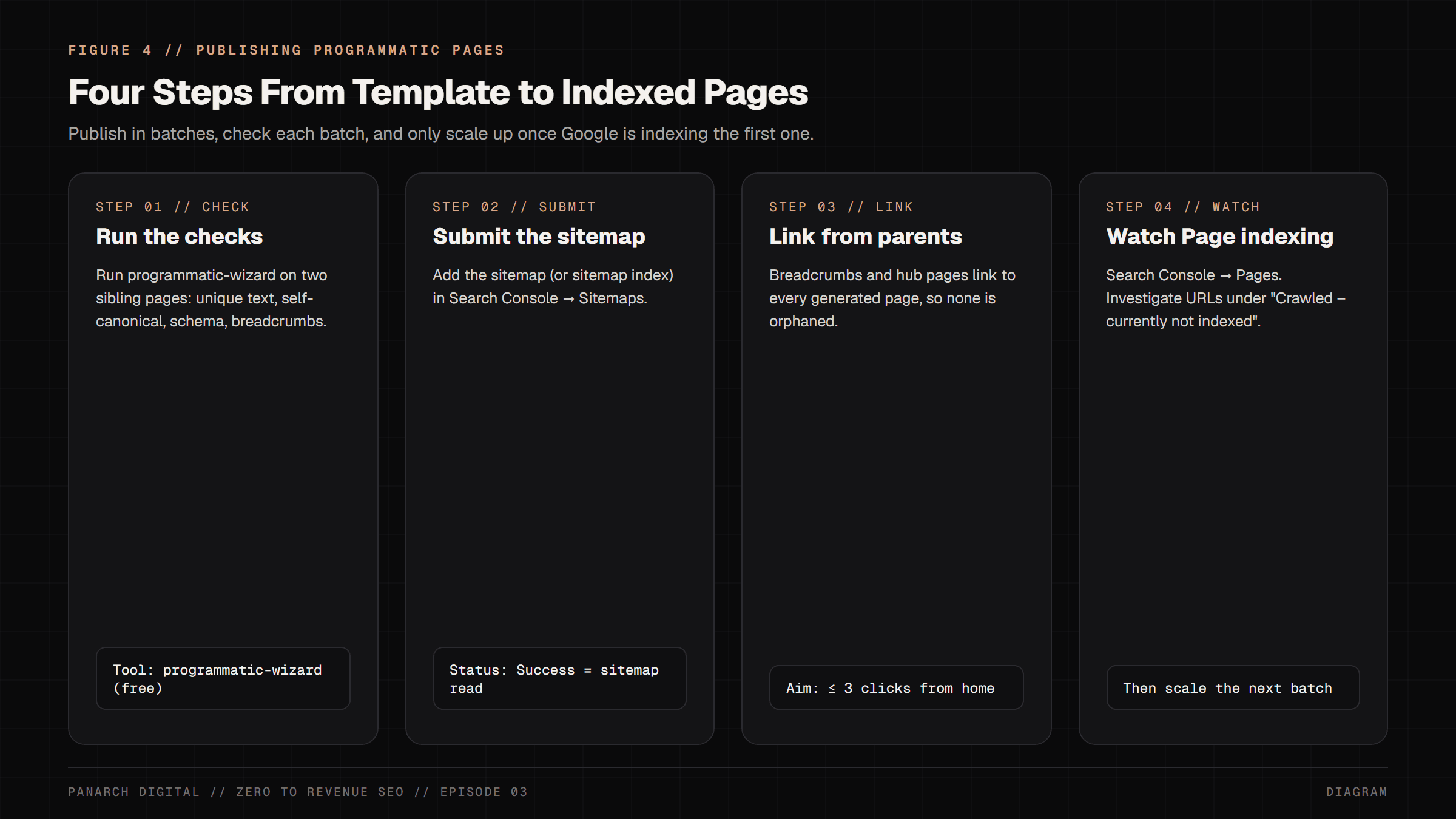
- Run the checker in this lesson on two live pages, or the open-source wizard: npx --package=github:Arpan-Tyagi/panarch-seo-wizards programmatic-wizard <url-a> <url-b>.
- Pass
- Search Console → Pages shows the new URLs as “Submitted and indexed”.
- Fail
- URLs pile up under “Crawled - currently not indexed”: the pages need more facts of their own.
Episode 3 of the free Zero to Revenue SEO course. Previous: Episode 2, The Anatomy of a Perfect Web Page (/blog/zero-to-revenue-seo-on-page-perfect-page). Next: Episode 4, Speed & Core Web Vitals (/blog/zero-to-revenue-seo-speed-core-web-vitals).
In Episode 2, we opened up the surgical anatomy of a single, perfect webpage: the title tag billboard, the single H1 newspaper headline, compressed AVIF images, and descriptive internal link highways.
But once you have mastered the anatomy of one high-converting page, a fundamental business question emerges: How do you scale that asset into 100, 500, or 1,000 landing pages without hiring an army of copywriters or spending twelve months typing by hand?
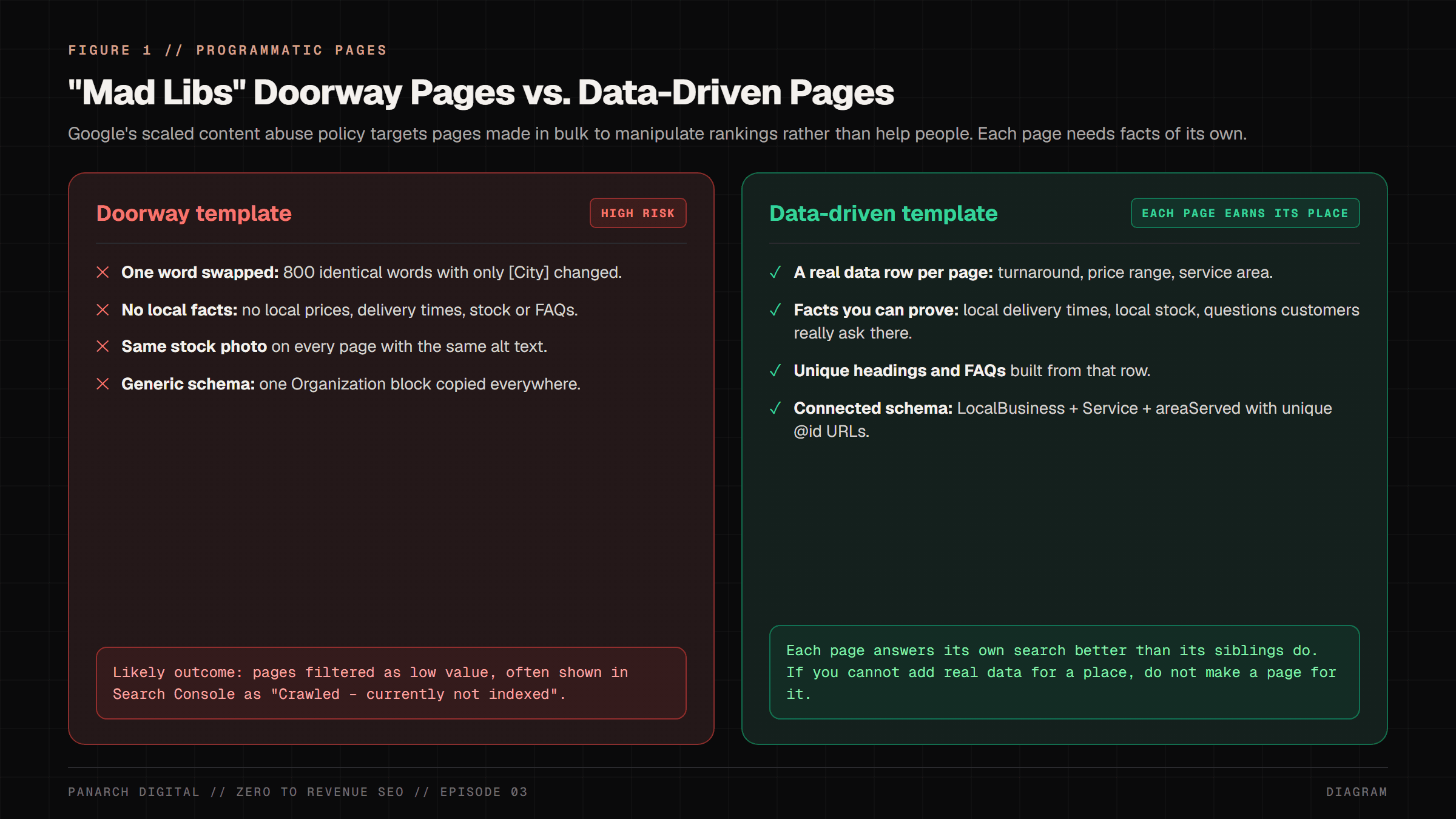
For most businesses, the answer they are sold by traditional marketing agencies is a catastrophic trap called 'Mad Libs SEO': writing one generic template and using a script to swap a single city or industry name (e.g. 'Best Web Design in Austin', 'Best Web Design in Dallas', 'Best Web Design in Denver').
In March 2024, Google added a scaled content abuse policy to its spam policies, and a great many thin doorway pages ended up in the algorithmic graveyard: 'Crawled - currently not indexed'.
Yet companies like Wise (currency-conversion pages), Zapier (app-integration pages), Zillow and Tripadvisor run very large programmatic page sets that rank, because each page carries data a searcher actually needs.
In this masterclass, we teach you the exact difference between a thin doorway spam trap and an engineering-grade modular factory—providing click-by-click no-code guides for Shopify and Webflow, production Next.js 16 code, and a free open-source wizard that runs the checks for you.
The Mental Model: The Modular Luxury Factory vs. 1,000 Photocopies
To understand why Google rewards certain programmatic websites while banishing others, consider an everyday mental model: Imagine you want to send thank-you letters to 1,000 customers.
If you sit down with a fountain pen and write 1,000 unique letters by hand, it takes you six months.
If, instead, you write one generic corporate letter, photocopy it 1,000 times, write each customer's name on top in ballpoint pen, and mail it out, what happens?
Every customer recognizes it as junk mail within half a second and tosses it directly into the recycling bin.
That generic photocopy is exactly what an amateur doorway page represents to Googlebot.
When a search crawler visits 500 pages on your website and discovers that almost every sentence is identical, with only the city name swapped in the headline, it recognizes that your website provides zero incremental information gain.
Google tends to crawl such clusters less and leave most of the pages out of its index.
Now contrast that with a modular luxury furniture factory. The factory does not hand-carve every individual screw from raw iron, but it also never ships generic cardboard boxes.
It manufactures a precision-engineered structural chassis, and then customizes every single piece with unique hardwood grains, tailored upholstery fabrics, specific room dimensions, and verified client hardware.
In programmatic SEO, your template is the architectural chassis, and your relational database is the custom upholstery. Every page must contain distinct, proprietary data points that cannot be found anywhere else on your domain.
The Anatomy of Google's March 2024 Scaled Content Abuse Policy
To build programmatic pages that survive algorithmic updates for years, you must understand what search engine quality raters and automated spam classifiers look for.
Google's spam policies define it like this: 'Scaled content abuse is when many pages are generated for the primary purpose of manipulating search rankings and not helping users.' Google adds that it makes no difference how the pages were made, by automation, by people, or both.
Google does not publish a single test for this. A useful heuristic for writers is information gain: does each page add something its siblings do not?
If a human searcher lands on your page, does the page answer their specific, local, or contextual query with verified facts, local details, and actionable steps? Or does it force them to bounce back to Google to find a real answer?
- The Thin Doorway Trap: 1 static template where 90%+ of the text is boilerplate marketing fluff, containing zero unique local telephone numbers, zero localized pricing tiers, and zero verified customer testimonials.
- The High-E-E-A-T Modular Engine: A relational database schema where each row injects 12 to 16 distinct proprietary fields—real turnaround hours, service areas, local facts you can prove, specific neighborhood boundaries, and custom Schema.org entity nodes.
- Self-Referential Canonical Defense: Every programmatic URL must declare its own absolute URL in the <link rel='canonical'> tag. Pointing all programmatic variants back to a root category canonical collapses your indexing footprint.
- Information Gain (a heuristic, not a published Google score): pages with specific, checkable facts such as numbers, local details and real operational data are more useful than vague generated prose, and usefulness is what Google's systems try to reward.
The Single Source of Truth: The 12-Column Relational Data Matrix
The biggest mistake beginners make in programmatic SEO is starting inside their CMS editor or writing code before organizing their data.
The foundation of every scalable search asset is a clean, normalized relational dataset stored in Google Sheets, Airtable, or a PostgreSQL database.
Below is the 12-column matrix we use for location pages. The figure shows five of the columns with sample rows for a fictional studio; in your own sheet, every value must be true for that place:
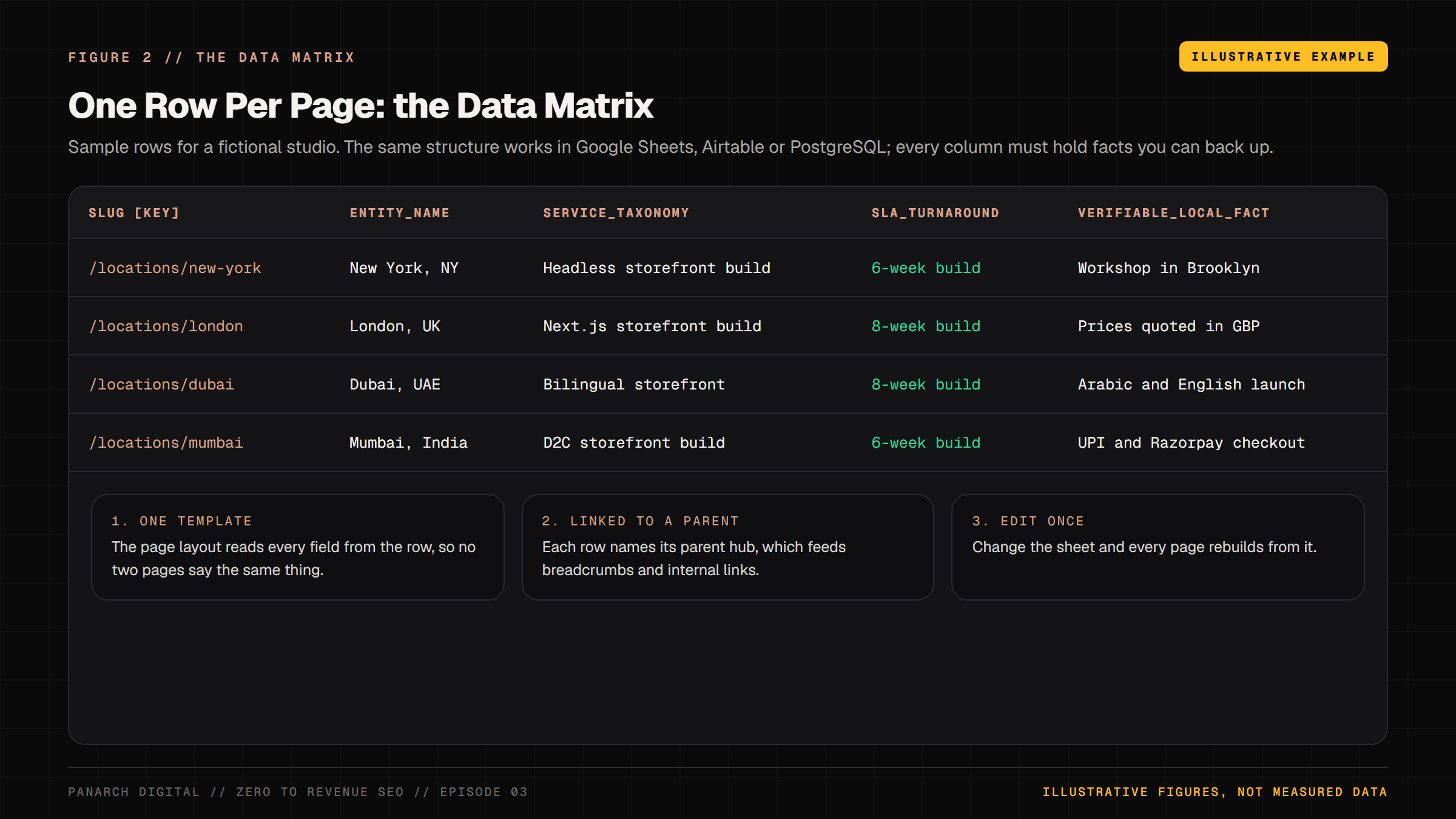
- Column 1 (slug [Primary Key]): The clean, lowercase, hyphenated URL path (e.g. 'locations/new-york', 'locations/london', 'locations/mumbai').
- Column 2 (entity_name): The formal geographical or technical entity (e.g. 'New York, NY', 'London, UK').
- Column 3 (service_taxonomy): The specific high-intent transactional service (e.g. 'Enterprise Headless Next.js Development').
- Column 4 (sla_turnaround): A delivery time you actually meet in that market (e.g. '6-week build').
- Column 5 (pricing_range): Your real published price range in local currency, only if you quote it there. Leave it blank rather than invent one.
- Column 6 (verifiable_local_fact): A fact about serving that place that you can prove, with a link to the evidence (e.g. 'UPI and Razorpay checkout', 'Prices quoted in GBP'). Never put certifications, registrations or case studies here unless they are real for that location.
- Column 7 (neighborhoods_list): Specific localized sub-regions (e.g. 'Manhattan, Brooklyn, Queens, Tri-State Corridor').
- Column 8 (custom_h1): Formula-driven headline: '[Service] in [City]: [Operational SLA] & [Proof]'.
- Column 9 (meta_description): 150-character sales pitch pairing the local pain point with verified risk reversals.
- Column 10 (geo_coordinates): Exact latitude and longitude for LocalBusiness Schema.org geocoding.
- Column 11 (localized_faq_q1 & a1): Unique, non-repeating question addressing regional compliance or logistical constraints.
- Column 12 (parent_pillar_slug): The category hub URL (e.g. '/services/web-dev') feeding hierarchical breadcrumbs.
Track A: The Non-Coder Step-by-Step SOP (Shopify & Webflow)
If you are a non-technical founder running an e-commerce store on Shopify or a marketing website on Webflow, you do not need to write custom backend scripts to execute programmatic SEO. Follow this exact 4-step SOP:
Step 1: Build & Export Your Spreadsheet in Google Sheets. Populate your rows using the 12-column matrix shown above. Make sure every row has real, specific values, and that every fact in it is one you can prove.
Click File > Download > Comma Separated Values (.csv).
Step 2: Webflow CMS Collection Setup. Open your Webflow project dashboard. In the left navigation rail, click the CMS Collections icon (the database cylinder) > Create New Collection. Name the collection 'Locations' or 'Services'.
Add custom fields corresponding exactly to your spreadsheet columns (Plain Text for entity_name and for pricing_range, because a range is text rather than a number, and Link for parent_pillar).
Click 'Import' in the top right corner, upload your CSV, map the headers, and confirm the import. Webflow creates one page per row. Check your plan's CMS item limit first; large page sets need a higher plan.
Step 3: Webflow Dynamic Template Binding. Navigate to Pages Panel > CMS Collection Pages > Locations Template. Drag in an H1 element. In the element settings on the right sidebar, check 'Get text from Locations' and select 'custom_h1'.
Drag in your pricing badge, description paragraph, and contact CTA, binding each visual node to its respective CMS field.
Under Page Settings > SEO Settings, build the Title Tag from fields (for example service_taxonomy + entity_name) and set the Meta Description to the meta_description field. Click Publish to Production.
Step 4: Shopify Matrixify Workflow. If you are scaling product or collection landing pages on Shopify, install the Matrixify app from the Shopify App Store. Export your existing collections to an Excel spreadsheet.
Add your custom columns as Metafields (e.g. 'custom.regional_delivery_hours', 'custom.local_distributor'). Re-import the spreadsheet via Matrixify.
In your Shopify Online Store Theme Customizer, select your Collection Template, click on any text block, and click the 'Insert Dynamic Source' icon (the database coin) to bind the block to your metafield.
Track B: The Sovereign Engineering SOP (Next.js 16 App Router, for Developers)
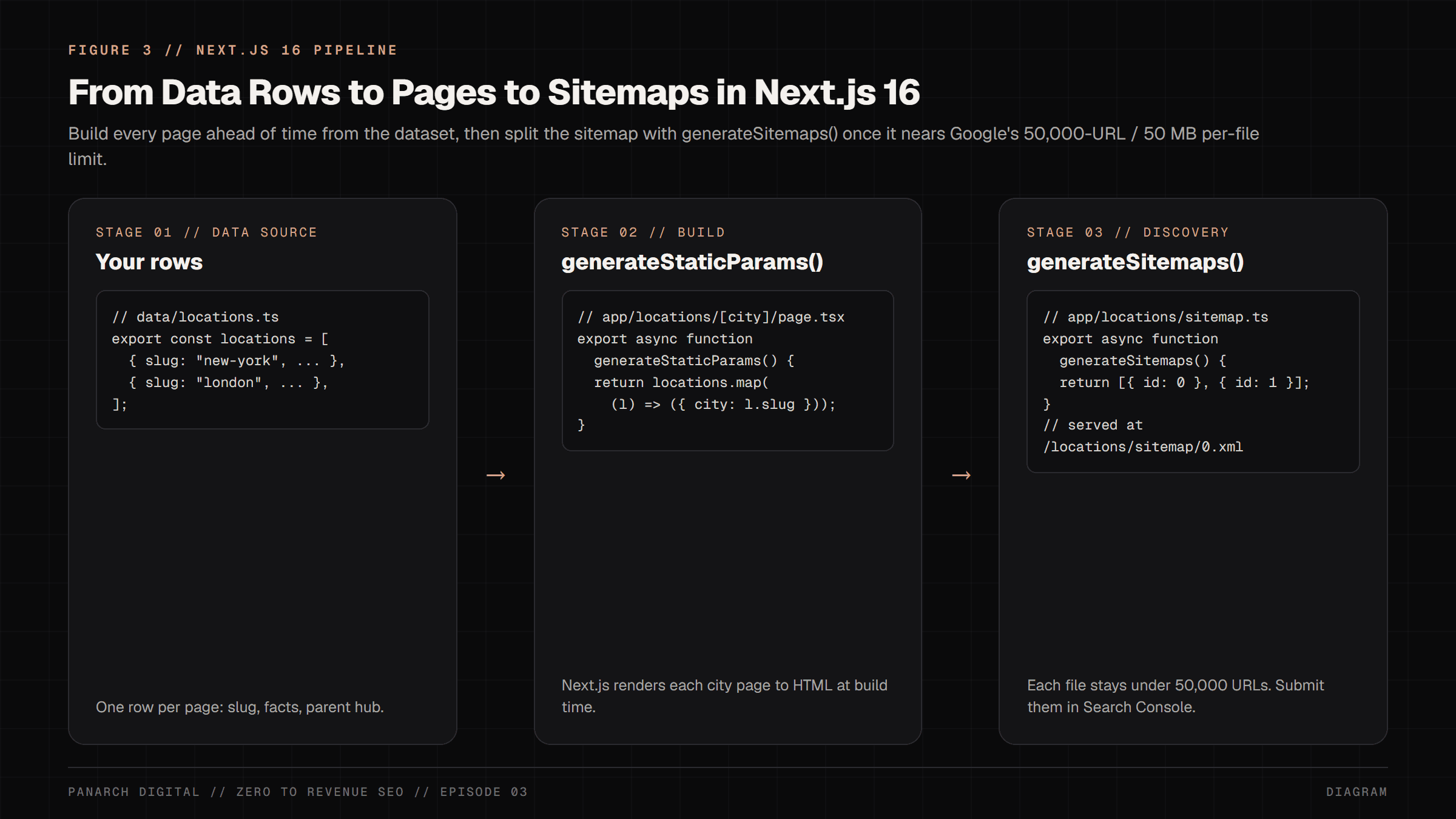
For engineering teams building sovereign web applications in Next.js 16, programmatic SEO is achieved by combining dynamic folder routing, static generation at build time with generateStaticParams(), and split sitemaps with generateSitemaps().
Below is the production implementation:
import { notFound } from "next/navigation";
import type { Metadata } from "next";
import { locationsDataset } from "@/data/locations";
import { Breadcrumbs } from "@/components/ui/Breadcrumbs";

interface PageProps {
  params: Promise<{ city: string }>;
}

// 1. Ahead-of-Time Static Generation for 1,000 Programmatic Routes
export async function generateStaticParams() {
  return locationsDataset.map((loc) => ({
    city: loc.slug,
  }));
}

// 2. Programmatic Metadata Engine (Title & Self-Canonical)
export async function generateMetadata({ params }: PageProps): Promise<Metadata> {
  const { city } = await params;
  const data = locationsDataset.find((l) => l.slug === city);
  if (!data) return {};

  // Keep the formula short in the data; never slice titles mid-word.
  const cleanTitle = `${data.serviceTaxonomy} in ${data.cityName} | Panarch Digital`;
  const canonicalUrl = `https://panarchdigital.com/locations/${data.slug}`;

  return {
    title: cleanTitle,
    description: `Looking for ${data.serviceTaxonomy.toLowerCase()} in ${data.cityName}? ${data.verifiableLocalFact}. Typical turnaround: ${data.slaTurnaround}.`,
    alternates: {
      canonical: canonicalUrl,
    },
    openGraph: {
      title: cleanTitle,
      url: canonicalUrl,
      images: [{ url: `/api/og?title=${encodeURIComponent(cleanTitle)}&location=${encodeURIComponent(data.cityName)}` }],
    },
  };
}

// 3. React Server Component: Pure Edge HTML with Zero Client Hydration
export default async function ProgrammaticLocationPage({ params }: PageProps) {
  const { city } = await params;
  const data = locationsDataset.find((l) => l.slug === city);
  if (!data) notFound();

  const jsonLd = {
    "@context": "https://schema.org",
    "@graph": [
      {
        "@type": "LocalBusiness",
        "@id": `https://panarchdigital.com/locations/${data.slug}/#business`,
        name: `Panarch Digital - ${data.cityName}`,
        description: data.uniqueDescription,
        areaServed: { "@type": "AdministrativeArea", name: data.cityName },
        priceRange: data.pricingRange,
        geo: { "@type": "GeoCoordinates", latitude: data.lat, longitude: data.lng },
      },
      {
        "@type": "Service",
        "@id": `https://panarchdigital.com/locations/${data.slug}/#service`,
        name: data.serviceTaxonomy,
        provider: { "@id": `https://panarchdigital.com/locations/${data.slug}/#business` },
      },
    ],
  };

  return (
    <main className="max-w-5xl mx-auto px-6 py-16">
      <script type="application/ld+json" dangerouslySetInnerHTML={{ __html: JSON.stringify(jsonLd) }} />
      <Breadcrumbs items={[{ label: "Home", href: "/" }, { label: "Locations", href: "/locations" }, { label: data.cityName, href: `/locations/${data.slug}` }]} />
      <h1 className="mt-8 text-4xl font-extrabold text-foreground tracking-tight">{data.customH1}</h1>
      <div className="mt-6 grid grid-cols-1 md:grid-cols-3 gap-6 font-mono text-xs">
        <div className="p-4 rounded-xl border border-border bg-surface">TURNAROUND: <strong className="text-primary">{data.slaTurnaround}</strong></div>
        <div className="p-4 rounded-xl border border-border bg-surface">RATES: <strong className="text-primary">{data.pricingRange}</strong></div>
        <div className="p-4 rounded-xl border border-border bg-surface">LOCAL FACT: <strong className="text-primary">{data.verifiableLocalFact}</strong></div>
      </div>
    </main>
  );
}Splitting Large Sitemaps with generateSitemaps()
One sitemap file can hold up to 50,000 URLs or 50MB uncompressed. Past that, you must split it into several files.
Splitting earlier also helps with reporting: if each file covers one section (cities, products, guides), Search Console shows you which section is not getting indexed.
Next.js 16 has this built in. Export generateSitemaps() from a sitemap.ts file and Next.js serves one file per id at /locations/sitemap/0.xml, /locations/sitemap/1.xml and so on:
import type { MetadataRoute } from "next";
import { locationsDataset } from "@/data/locations";

const PER_FILE = 50000; // Google's limit per sitemap file

export async function generateSitemaps() {
  const files = Math.ceil(locationsDataset.length / PER_FILE);
  return Array.from({ length: files }, (_, id) => ({ id }));
}

export default async function sitemap(props: {
  id: Promise<string>;
}): Promise<MetadataRoute.Sitemap> {
  const id = Number(await props.id);
  return locationsDataset
    .slice(id * PER_FILE, (id + 1) * PER_FILE)
    .map((loc) => ({
      url: `https://yourdomain.com/locations/${loc.slug}`,
      lastModified: loc.updatedAt, // the row's real edit date
    }));
}The Master Tool Stack: Tools to Use & How to Use Them (Free vs. Low-Cost)
You do not need an enterprise software subscription costing thousands of dollars per month to build, audit, and index 1,000 programmatic pages. Below is the complete zero-cost toolchain:
- Google Sheets / Airtable [₹0 / Free]: Your primary relational database. Use it to define primary keys, local proofs, pricing tiers, and formulas before touching your CMS.
- Google Search Console Pages report and URL Inspection API [₹0 / Official Google]: The Pages report shows which submitted URLs are indexed and why the rest are not. Developers can check up to 2,000 URLs a day per property through the URL Inspection API.
- Screaming Frog SEO Spider [₹0 up to 500 URLs / Free Tier]: The gold-standard desktop crawler for identifying duplicate title tags, broken canonical loops, and thin word counts across programmatic directories.
- Panarch Programmatic Wizard [₹0 / Open source, MIT]: Our free script that compares sibling pages for shared text and checks canonical tags, schema and breadcrumbs. Code at github.com/Arpan-Tyagi/panarch-seo-wizards.
- Google Rich Results Test [₹0 / Official Google]: Validates that your dynamic Schema.org JSON-LD blocks are parsed cleanly as rich snippet entities without syntax errors.
3-Minute SOP: Running the Panarch Programmatic Diagnostic Wizard
Before submitting new programmatic landing pages to Google Search Console, check them for doorway risks. The free, open-source Programmatic Wizard (MIT licence, github.com/Arpan-Tyagi/panarch-seo-wizards) inspects the live HTML of two or more sibling pages in one pass. You only need Node.js 18.17 or newer.
# Run it straight from GitHub (needs Node.js 18.17+):
npx --package=github:Arpan-Tyagi/panarch-seo-wizards \
  programmatic-wizard \
  https://yourdomain.com/locations/mumbai \
https://yourdomain.com/locations/delhiThe wizard checks six things on every page: 1) HTTP status, 2) a clean URL path without query parameters, 3) a self-referencing canonical tag, 4) word count (it warns under 300 words), 5) Schema.org JSON-LD and breadcrumbs, and 6) how much text the sibling pages share, measured as identical 5-word phrases (70% or more is a warning, 90% or more a failure).
It prints a checklist score out of 100 with a fix list. The score is the tool's own checklist, not a Google ranking signal.
Live Verification: Green Pass vs. Red Diagnostic Flags
How do you know if your programmatic pages are succeeding in Google Search? Track these exact metrics inside Google Search Console:
- Green Pass (Indexation Fortress): In Google Search Console under Indexing > Pages, pick your sitemap from the 'All submitted pages' filter and watch the Indexed count rise. In Search Performance, total impressions steadily climb as Googlebot ranks long-tail queries (e.g. 'headless Next.js agency Austin').
- Red Flag (Thin Doorway Penalty): URLs accumulate under 'Crawled - currently not indexed'. This means Google crawled the page and chose not to index it for now. With programmatic pages, the usual cause is siblings that are too similar to add anything new.
- Red Flag (Canonical Collapse): Google Search Console reports 'Duplicate without user-selected canonical'. This occurs when near-identical pages lack a self-referencing canonical tag, so Google picks a sibling or the parent category as the canonical instead and this page cannot rank on its own.
- Actionable Recovery: If URLs are stuck in 'Crawled - currently not indexed', do NOT simply delete them. Add only data you can prove for that location: local delivery times, stock, service areas, and FAQs from questions customers there really ask. If you have nothing true and specific to add for a place, merge that page into its parent or mark it noindex. Then resubmit the sitemap and request indexing for a few sample URLs.
The Panarch Digital Programmatic Data Matrix (Notion Template)
To help founders and engineering teams implement this architectural blueprint without starting from scratch, Panarch Digital is turning this data matrix into a free Notion template. It is being published now; until it is live, the 12 columns above are the template.
It will contain the 12-column structure, Webflow CMS field mappings, and Next.js 16 TypeScript interfaces.
When it is live, the link will appear on the course resources hub (/resources). Meanwhile, you can inspect our own 11-city example at (/locations). It is a small set, built with the same template and data approach.
Frequently asked
What is the difference between Programmatic SEO and thin doorway pages?
Thin doorway pages are low-quality pages created with identical marketing copy where only a single variable (such as a city name) is swapped, providing zero unique value or information gain. High-E-E-A-T Programmatic SEO uses structured relational datasets to inject authentic, unique data into every page—such as real turnaround times, service areas, local facts you can prove, specific neighborhood boundaries, and custom Schema.org entities.
How does Google's March 2024 Core Update treat programmatic content?
In March 2024 Google added a scaled content abuse policy: many pages generated mainly to manipulate rankings rather than help people, however they are made. Near-duplicate, low-value pages often stay out of the index ('Crawled - currently not indexed') or rank poorly, and serious cases can get a manual action. Pages built on real, distinct data are not the target, but no setup is immune if the pages do not help searchers.
Why is a self-referential canonical tag required on programmatic landing pages?
A self-referential canonical tag (<link rel='canonical' href='https://yourdomain.com/locations/city'>) explicitly declares to search crawlers that the page is an independent, authoritative document. If it is missing and the pages look alike, Google may choose a sibling or the parent category as the canonical instead, preventing individual pages from ranking for long-tail search terms.
How many programmatic pages should a website publish at once?
Avoid publishing 10,000 pages overnight on a fresh domain with low crawl authority. The recommended strategy is phased rollouts: publish an initial batch of 25 to 50 high-priority commercial hubs, verify that Googlebot indexes them cleanly and awards search impressions, and then scale progressively in batches of 100 to 500 URLs backed by internal breadcrumb links.
Can I execute programmatic SEO on Shopify without custom coding?
Yes. Non-technical store owners can build their data matrix in Google Sheets, export to CSV, and use the Matrixify app to map custom data fields into Shopify Metafields. You can then use the Shopify Theme Customizer to bind dynamic storefront blocks (such as regional delivery estimates, local stock counters, and custom guarantees) directly to those metafield sources.
Sources
- Google Search Central: Spam policies for Google web search
- Google Search Central: Learn about sitemaps
- Schema.org: LocalBusiness
- Next.js docs: generateStaticParams
- Next.js docs: generateSitemaps
- Google Search Central Blog: Sitemaps ping endpoint is going away (2023)
- Google Search Central: How to specify a canonical URL
Related